My Arm’s Big Adventure

Last time, I wrote some ramblin’ words about my upcoming server upgrade. Well, using every scrap of time I could gather, every handful of seconds between tasks; I’ve finally managed to swap out the old server board for the new one. It’s in place and it’s really cool!

…except, thus far, I’ve not really set up a great deal of software on there as yet. Never mind, let’s talk about the hardware side of things.

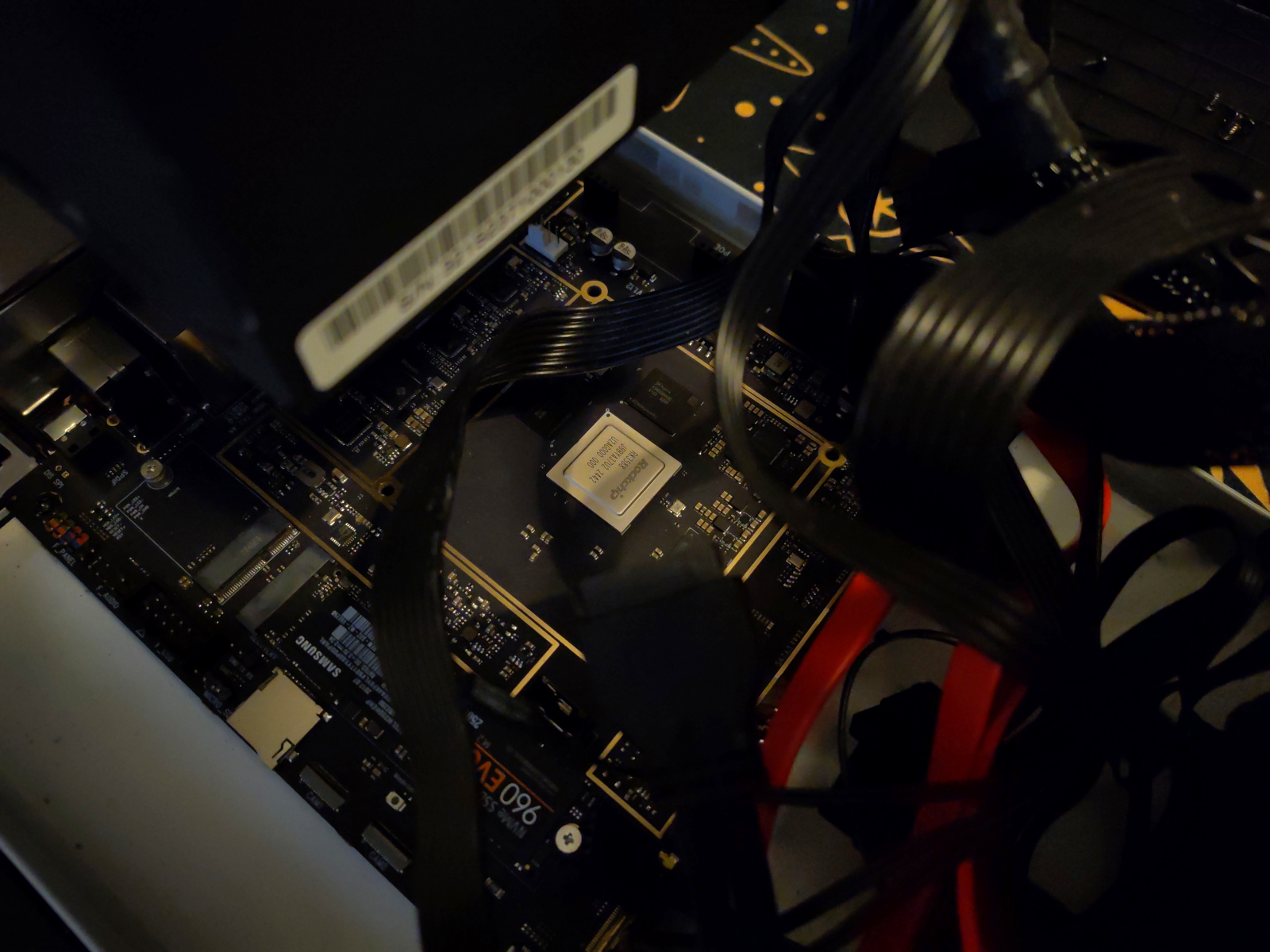
The board I ended up with is a Rock 5 ITX. I’ve long toyed with the idea of upgrading my server from x86 to an ARM or even a NUC, mainly for the purposes of power efficiency; but until now, I’ve never come across a board I’ve been fully happy with.

Anyhow, in a recent wave of server-based obsession, I was having a little read of the documentation for Jellyfin – and while they don’t necessarily recommend it, they do suggest that Jellyfin on ARM is possible using a chip known as the RK3588. A little more research, particularly this very useful blog post, spurred me into finally biting the bullet and picking something up.

The Rock 5 ITX ticks most of my boxes.

The bad: the RAM is baked into the SBC, meaning I can’t ever upgrade or replace the RAM. This is a common feature with anything not x86-based, and has always been a bit of a dealbreaker – especially considering these boards usually cap out at 8GB.

The good: it’s a Mini-ITX form factor, so I can put it in my existing case; it takes ATX power; it’s got a very spacious 24GB RAM; and it incorporates that coveted RK3588 chip. It’s also technically compatible with a standard Intel cooler, but… we’ll get onto that.

Storage-wise, it’s got an NVMe slot, as well as four (!) SATA ports. And a built-in eMMC module, though it’s only 8GB and therefore slightly useless. AND it’ll take a MicroSD card – which I understand performs extremely well, but on a board where you’ve got far better options for storage than a MicroSD card.

Setting it up in the first instance was a pain in the butt, though that’s mainly because I kind of lack the equipment for modern devices such as this. Give me a Windows 98 PC, and I’ve got PS/2 keyboards and VGA monitors aplenty. This thing, with its 5V barrel jack and USB and nothing but a HDMI output? I ended up having to rummage through my box of power supplies (I have many) for one that fit; and to get a video out, I had to connect it to my laptop via my little USB-C capture card.

On first boot, you get a somewhat overengineered setup program. Not only does this require a mouse – a cardinal sin for an OS setup, in my book – but it also requires an Internet connection. I hadn’t accounted for this, and ended up with the board sat on my chair in the centre of the room, connected to power and HDMI at one end, and the network point at the other.

In hindsight, I could’ve used the smaller M.2 slot and stuck in one of the handful of Wi-Fi cards I’ve accidentally amassed. But, y’know. Didn’t do that.

The setup program is weirdly Android-y, and presents a selection of OS which are designed to work with this board. But, in my research, I’d found it was possible to flash an alternative bootloader and just install whatever you wanted. So, I picked Armbian because it felt safe, did the flashing thing, and got to work installing…

…something. Anything.

My original plan was to use openSUSE. I could list a whole bunch of reasons here, but the reality is that SuSE was my very first Linux experience, and I’ve been looking for an excuse to use it. And given it’s got a bit of an enterprise-y flavour, it feels suitable for my server.

My research suggested that the SBC wanted a fairly up-to-date Linux kernel for everything to work properly, so I opted for openSUSE Tumbleweed, their rolling release distro. I stuffed it onto a USB flash drive and got it booted up.

…and it would hang trying to load the installer. Every time. And I tried lots of times in lots of different ways. I managed to boot a live USB, so clearly the OS itself worked, but the installer wasn’t having any of it!

I also tried Fedora IoT, which I don’t think I even managed to boot. AlmaLinux 10 fared a bit better, getting most of the way through setup, but it encountered a fatal error partway through the installation process.

Eventually, I coerced openSUSE to install by switching to a different TTY, killing YaST (i.e. the magical SUSE setup-everything tool), then manually launching it again in text mode. And it worked absolutely fine, which just goes to prove that graphical OS installers were a mistake. (Although the Fedora installer is quite nice.)

Getting it into the case wasn’t much to write home about, although I ran into an unfortunate realisation regarding my beloved Noctua CPU cooler.

CPU coolers are essentially a big chunk of metal, with big fins for heat dissipation, and a big fan stuck on top for even more heat dissipation. The one I have, a Noctua L9i, is built for tiny PCs like my server… and also built for x86 CPUs. And, despite having eight cores, a GPU, an NPU, and a bunch of RAM on the same chip; the RK3588 is way smaller – and flatter – than any x86 CPU.

So I ended up with a gap of maybe a centimetre or more between the chip and the bottom of the cooler. (And, to add insult to injury, the cooler ended up shorting out the board when it was installed.)

The fact is, though, the RK3588 doesn’t actually need a cooler for most tasks. Bit like a 386 in that regard.

You know what else is a bit like a 386? The fact that this board doesn’t do ACPI. ACPI is, in a nutshell, the thing that helps computer software interface with the surrounding hardware; and the most obvious advantage is that when you shut your operating system down, the PC automatically shuts down with it.

But if you don’t have ACPI support, you shut down your OS and the computer just kinda… sits there. In the Windows 95 days, you’d get a screen telling you it was safe to turn off your computer; the Rock 5 ITX unfortunately lacks this. To fully power it off, you need to physically pull the power. (Or flick the switch on the PSU.)

…I kinda like it? Makes the server feel more like a server and not just a PC wearing a server’s hat. Does that make any sort of sense?

Anyway, the manufacturers of the Rock 5 ITX also sell a cooler… designed for the Rock 5 ITX. Those jerks.

So, what’s next? Obviously, setting up all my containers again. That shouldn’t be a big task, and I’m pretty sure everything will work just the same on ARM as it did on x86. So far, so good.

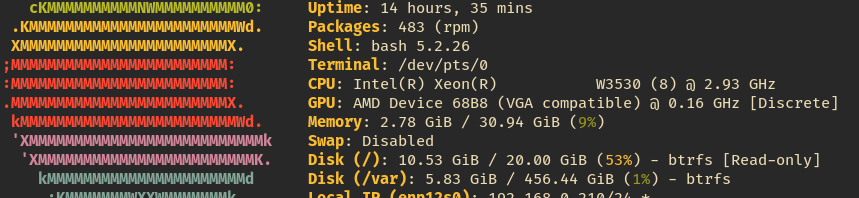
What I’m struggling with is hardware acceleration in Jellyfin, and that’s mainly down to the fact that all the documentation – and even the blog post I linked to before – reference files and software that I just don’t seem to have. openSUSE may have been a questionable choice in that regard, but even under AlmaLinux and Debian, I’m not seeing much in the way of – for example – drivers for the Mali GPU or libraries for the Rockchip MPP platform. Thus far, this has been an exercise in frustration and dead ends. I’m sure there must be a solution here, but I’ve yet to find it.

I mean, Jellyfin works. Just feels like I went out of my way to get something that’s supposed to work with it, and it still doesn’t work to full capacity, and it sucks!

Let’s end on a lighter note. I think this board is very cool. It doesn’t really do much that my previous server did, but it is a much more modern system, and it’s going to be more efficient in terms of power draw and in terms of responsiveness. I’m excited.


Rearming the Server

I’ve run a home server in various forms for, gosh, getting on for a decade now. At first, the “server” was just my PC, and if I wanted to use any services I’d have to leave it switched on. Since then, I’ve been through Raspberry Pis, my Dell PowerEdge running VMware, briefly my PowerMac; and currently I’ve got a mini server cobbled together out of old parts.

Said server works very well, but I’ve grown increasingly conscious of its power draw. By my rough measurement, it uses about 40-50W when idle. This is, of course, much better than the 200+W used by the PowerMac, and the chunk of power my desktop PC uses. I was always under the impression that modern computers were efficient, but apparently that’s not always the case…

…anyhow, even with aggressive power-saving options in both OS and BIOS, it’s still using a bit more power than I’d like. The old Core i7 CPU in there isn’t great at transcoding video, either. So, for a few years on-and-off, I’ve been hunting for an alternative.

If you visit certain self-hosting and homelabbing forums, specifically those on a website with a red-orange colour scheme and a creepy CEO, there’s a bit of a pattern. You have the guys with their full-blown dual Intel Xeon workstations, probably with a million graphics cards in ’em so they can, I dunno, talk to a chatbot I guess; and on the other end, you’ve got these lovely compact labs filled with tiny little machines. Time was that I’d have been quite thrilled by a proper server rack, but nowadays I’m much more interested in having something small, quiet, and cheap to run. Something like a NUC, or one of those miniature Lenovo ThinkCentres which are apparently rather good servers.

But I have kind of exacting requirements, and while I did put together a plan to upgrade my mini server, I’ve never been in a position to justify it. Partly because it’s hard to tell what sort of power draw a given x86 CPU is going to use, and since that’s the main goal, it’s even harder to take the plunge.

So here I am with a brand-new board, brought to market only last year. Wait, what?

There are tons of single-board computers out there, and many of them make for great little servers. The Raspberry Pi was the progenitor, and since then you’ve had all sorts of different micro SBCs – invariably calling themselves some sort of ‘Pi’ (but, hilariously, none of which is an actual type of pie). The problem I’ve always had is that I wanted something inexpensive, with expandable memory, and – crucially – able to run stuff like Jellyfin.

Unfortunately, there doesn’t exist a board that fits those exacting specifications. What does exist is: a Mini-ITX board (fits in my existing case), powered by a standard ATX power supply (like the one I already have) with SATA ports (I can connect my big WD Green hard drive) and an ARM chip which – according to my research – works great with Jellyfin. And it takes a standard modern-ish Intel cooler, meaning I can also connect my beloved Noctua heatsink!

So, the reason I went against my usual programming (that is, buy cheap and second-hand and hope for the best), I’ve rushed to AliExpress to buy one of these perfect boards. Which, in case you’re curious, is a Rock 5 ITX sporting a Rockchip RK3588… er… CPU/GPU/RAM blob.

I’ve still yet to fully set it up, and I’m sure I’ll have more for you in a future blog post about the topic. I might’ve got further already, but between this being an ARM chip and me having to work on it in whatever snatches of time I can get hold of right now, it’s taken me many days just to get an OS on it. And then figure out what I’m doing with it, because it turns out that openSuSE is a proper enterprise Linux and has lots of enterprise-y bits about it, like having to declare that your network is in fact a home network and it’s okay to let me access port 8096 from a local address…!

I’m excited to explore this board some more and test its capabilities. And see how much more efficient it is! (I hope it is appreciably more efficient now, after all this…)

One problem: I left it powered on all day and now it’s turned off and won’t start up again. I hope I haven’t toasted it already.

Bundle Theory of the Self-Host

This isn’t a proper “top 5” or anything, because how can one truly make a top 5 of software? Each one has its own use-case and its own quirks, and unless you’ve got a so-called everything app like Notion, they’re not going to even be remotely comparable. So, this is instead a list of smaller, single-purpose apps which I wanted to recommend for reasons unknown to science. I dunno. Just wanna talk about software a bit, yaknow?

Syncthing

Screenshot of the Syncthing dashboard. On the left is a list of shared directories. On the right is an overview of the current system.

Great app, questionable name. (Like so many in the self-hosted world. And the world at large, let’s face it. I came across a full commercial program called Womp3D recently. That’s where we’re at.)

Syncthing is a tiny app that runs on all your devices and syncs data between them. That’s its purpose, and it satisfies that purpose better than most commercial software I’ve tried. In fact, it does exactly what I originally loved about Dropbox, before they decided my money wasn’t good enough.

It uses a transfer method that’s a bit like torrenting – so, for instance, if a folder exists on devices A and B, and device C wants it, it can download chunks from both A and B to speed the download up. And then if anything changes, it can send little chunks back to A and B.

I like it because it doesn’t pfaff around. There’s no feature bloat – in fact, I don’t think there have been any big new features since I first tried it circa 2014. It certainly looks the same as it did, anyhow. It’s just a simple tool that’s darned good at syncing files between devices – like, for instance, syncing my entire music library to my server which I can then use in…

Navidrome

Screenshot of Navidrome albums list. On the left there are a series of categories to pick from, like Albums, Artists, or Songs. Subcategories include options like All, Random, Favourites, or Recently Played. In the centre is a grid of eight albums with large artwork. The page has a pleasing dark natural palette, with green highlights.

This one isn’t quite as tiny, but it still does one thing and one thing well.

Navidrome is best described, to the layperson, as a self-hosted Spotify. You can point it at your music, make playlists, rate (and I think even tag) your music, and it’ll even do things like artist radios and discovery queues for you. Quite why one would need to ‘discover’ their own music library escapes me, although I did see someone on Lemmy asking that very same question about their movie library… maybe I’m doing it wrong and everyone else is just pirating every movie and album on the planet for no reason? Who can truly say?

It’s also got nice themes, and recently it introduced a multi-library feature, which seems like it might be useful. I do like a good compartmentalise. Coupled with Syncthing, all I need to do is rip a CD to my computer, and it’ll show up in Navidrome within a few minutes, tags an’ all. Out of caution, I’ve done it as a one-way sync so that my computer is the ‘canonical’ source for my music library.

Cup

Screenshot of the Cup dashboard. (Nearly wrote 'cupboard'.) Along the top is an overview section, showing me how many monitored images there are, and which of those have available updates. Below that, there's a text list of images that require updates. Most have a little blue arrow next to them, which denotes a minor update is available. The top one has a red arrow, denoting a major update. It's got a sort of bluish grey colour scheme.

I used to run a little thing called Watchtower, which would periodically scan my Docker containers (for the laydividual: little boxes where apps live) to see if there were any updates available, and apply them automatically. Coming from a sysadmin background, that’s always a bit of a no-no. Ideally, you’d test your updates before blindly pushing them to a live server – to the extent that I had Watchtower’s features disabled on all but a couple of my services.

Anyway, Watchtower itself hasn’t been updated in years, and so I’ve instead taken a different approach. Cup presents a friendly little dashboard which just shows me what needs updating. Paired with Dockge, my chosen Docker container manager, I can then manually update if I want to; or I can use a script called Dockcheck to pull all the updates at once. I think that’s a better approach, and it means I have chance to read changelogs and see if anything’s been broken by the latest version. (This is why I have lots of little apps, and not one ‘everything’ app, you see?)

Glance

Screenshot of my Glance dashboard. In a three-column layout, it shows me the following items: the current date and time, a basic calendar, the stats of my server, a search bar, quick links to some websites, a grid list of my Docker containers, a feed of YouTube videos, the current weather, and a text list of bookmarks. The theme is similar to Navidrome's, but with a cooler overall feel.

Ah, the dashboard. Every self-hosted system needs a dashboard. After bouncing around a bunch of different dashboard implementations myself, I settled on Glance, which is easy to configure and does everything I need it to. I’ve actually got it set as my new tab page in Firefox, and it gives me instant access to all my self-hosted services as well as quick links to things like the admin page of this blog. It’s also got nice themes, which you can customise! One thing that’s missing: I’d like my Quick Links to be a horizontal list. (You can monkey around with the CSS so it’s probably fixable.)

GoToSocial

A photo of a sloth, hanging from a big tree branch. A baby sloth clings on. Both look quite content. The sky is blue and the tree is very green.

GoToSocial offers a lightweight ActivityPub server, similar to Mastodon but… well, lightweight. It’s not meant to have loads of users or loads of features, but it will do for my use case. …which is to have a small social network for close family. That’s kinda it, really! Whether it’ll take off is another matter, but the fact is there isn’t a great deal to see as yet. So, no screenshots. (Also, it’s secret, shhhh!)

Stealing the Mac

Previously, I’ve blogged about my super cool Mac Pro (which, at present, is serving as an ad-hoc shelf for my much smaller server). That post actually ended up with a massive chunk cut out, because it was getting too darn long. But it’s a fun story in and of itself, so here we are!

Continue reading “Stealing the Mac”

Severing my Mac

Previously, I blogged about my Mac Pro, and its workstationlike qualities making it ideal for a home server. Unfortunately, it turned out to be… less than ideal in practice, and so I’ve embarked on an all-new server adventure!

Continue reading “Severing my Mac”

Thoughts on Ad Blocking

Ads can be a nuisance, on that we can all agree. The even bigger issue, however, is that they’re by-and-large deeply unethical, and sometimes actively malicious.

Continue reading “Thoughts on Ad Blocking”

Servering my Mac

I graduated in 2017. Not long after that, my old college shut down. Even while I was there, they were packing the place up and shipping everything useful out to a different building; so, after asking politely, I ended up being the proud owner of a Mac Pro!

Continue reading “Servering my Mac”

Lunar’s Linux Guide!

Seems like every week, Microsoft does something so ridiculous that it ends up throwing off a bunch of Windows users. Trouble is, moving away from Windows is not an easy task. Here’s my little guide to try and make life a touch easier for those looking to make the switch.

Continue reading “Lunar’s Linux Guide!”

How to Install Any Plugin in OBS Studio Flatpak

After switching over to Debian earlier this year, I’ve generally found it to be a smooth transition – smooth compared to how it used to be, at any rate. But one thing I’ve really struggled with is OBS Studio.

Continue reading “How to Install Any Plugin in OBS Studio Flatpak”

Retro Capture Setup – Part 4

Well, it’s been a little while since my last blog post, and I’ve been tinkering with the site a little in a vague effort to get it to look a bit nicer. It’s not really worked, and now the site’s as plain as it can get. But, the show must go on!

Continue reading “Retro Capture Setup – Part 4”