My Arm’s Big Adventure
Updated:
Filed under:
Tagged:
Last time, I wrote some ramblin’ words about my upcoming server upgrade. Well, using every scrap of time I could gather, every handful of seconds between tasks; I’ve finally managed to swap out the old server board for the new one. It’s in place and it’s really cool!
…except, thus far, I’ve not really set up a great deal of software on there as yet. Never mind, let’s talk about the hardware side of things.
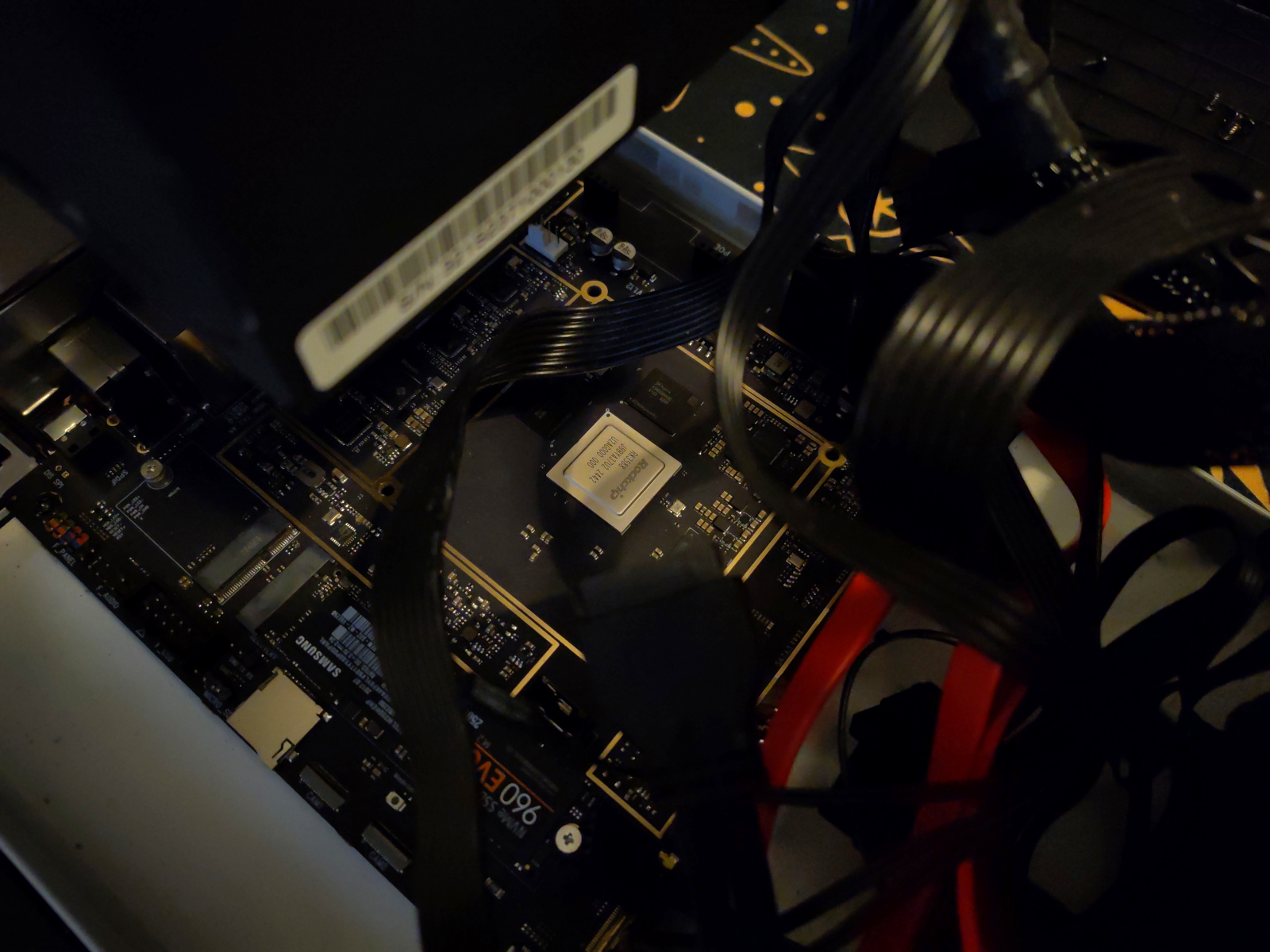
The board I ended up with is a Rock 5 ITX. I’ve long toyed with the idea of upgrading my server from x86 to an ARM or even a NUC, mainly for the purposes of power efficiency; but until now, I’ve never come across a board I’ve been fully happy with.
Anyhow, in a recent wave of server-based obsession, I was having a little read of the documentation for Jellyfin – and while they don’t necessarily recommend it, they do suggest that Jellyfin on ARM is possible using a chip known as the RK3588. A little more research, particularly this very useful blog post, spurred me into finally biting the bullet and picking something up.
The Rock 5 ITX ticks most of my boxes.
The bad: the RAM is baked into the SBC, meaning I can’t ever upgrade or replace the RAM. This is a common feature with anything not x86-based, and has always been a bit of a dealbreaker – especially considering these boards usually cap out at 8GB.
The good: it’s a Mini-ITX form factor, so I can put it in my existing case; it takes ATX power; it’s got a very spacious 24GB RAM; and it incorporates that coveted RK3588 chip. It’s also technically compatible with a standard Intel cooler, but… we’ll get onto that.
Storage-wise, it’s got an NVMe slot, as well as four (!) SATA ports. And a built-in eMMC module, though it’s only 8GB and therefore slightly useless. AND it’ll take a MicroSD card – which I understand performs extremely well, but on a board where you’ve got far better options for storage than a MicroSD card.
Setting it up in the first instance was a pain in the butt, though that’s mainly because I kind of lack the equipment for modern devices such as this. Give me a Windows 98 PC, and I’ve got PS/2 keyboards and VGA monitors aplenty. This thing, with its 5V barrel jack and USB and nothing but a HDMI output? I ended up having to rummage through my box of power supplies (I have many) for one that fit; and to get a video out, I had to connect it to my laptop via my little USB-C capture card.
On first boot, you get a somewhat overengineered setup program. Not only does this require a mouse – a cardinal sin for an OS setup, in my book – but it also requires an Internet connection. I hadn’t accounted for this, and ended up with the board sat on my chair in the centre of the room, connected to power and HDMI at one end, and the network point at the other.
In hindsight, I could’ve used the smaller M.2 slot and stuck in one of the handful of Wi-Fi cards I’ve accidentally amassed. But, y’know. Didn’t do that.
The setup program is weirdly Android-y, and presents a selection of OS which are designed to work with this board. But, in my research, I’d found it was possible to flash an alternative bootloader and just install whatever you wanted. So, I picked Armbian because it felt safe, did the flashing thing, and got to work installing…
…something. Anything.
My original plan was to use openSUSE. I could list a whole bunch of reasons here, but the reality is that SuSE was my very first Linux experience, and I’ve been looking for an excuse to use it. And given it’s got a bit of an enterprise-y flavour, it feels suitable for my server.
My research suggested that the SBC wanted a fairly up-to-date Linux kernel for everything to work properly, so I opted for openSUSE Tumbleweed, their rolling release distro. I stuffed it onto a USB flash drive and got it booted up.
…and it would hang trying to load the installer. Every time. And I tried lots of times in lots of different ways. I managed to boot a live USB, so clearly the OS itself worked, but the installer wasn’t having any of it!
I also tried Fedora IoT, which I don’t think I even managed to boot. AlmaLinux 10 fared a bit better, getting most of the way through setup, but it encountered a fatal error partway through the installation process.
Eventually, I coerced openSUSE to install by switching to a different TTY, killing YaST (i.e. the magical SUSE setup-everything tool), then manually launching it again in text mode. And it worked absolutely fine, which just goes to prove that graphical OS installers were a mistake. (Although the Fedora installer is quite nice.)
Getting it into the case wasn’t much to write home about, although I ran into an unfortunate realisation regarding my beloved Noctua CPU cooler.
CPU coolers are essentially a big chunk of metal, with big fins for heat dissipation, and a big fan stuck on top for even more heat dissipation. The one I have, a Noctua L9i, is built for tiny PCs like my server… and also built for x86 CPUs. And, despite having eight cores, a GPU, an NPU, and a bunch of RAM on the same chip; the RK3588 is way smaller – and flatter – than any x86 CPU.
So I ended up with a gap of maybe a centimetre or more between the chip and the bottom of the cooler. (And, to add insult to injury, the cooler ended up shorting out the board when it was installed.)
The fact is, though, the RK3588 doesn’t actually need a cooler for most tasks. Bit like a 386 in that regard.
You know what else is a bit like a 386? The fact that this board doesn’t do ACPI. ACPI is, in a nutshell, the thing that helps computer software interface with the surrounding hardware; and the most obvious advantage is that when you shut your operating system down, the PC automatically shuts down with it.
But if you don’t have ACPI support, you shut down your OS and the computer just kinda… sits there. In the Windows 95 days, you’d get a screen telling you it was safe to turn off your computer; the Rock 5 ITX unfortunately lacks this. To fully power it off, you need to physically pull the power. (Or flick the switch on the PSU.)
…I kinda like it? Makes the server feel more like a server and not just a PC wearing a server’s hat. Does that make any sort of sense?
Anyway, the manufacturers of the Rock 5 ITX also sell a cooler… designed for the Rock 5 ITX. Those jerks.
So, what’s next? Obviously, setting up all my containers again. That shouldn’t be a big task, and I’m pretty sure everything will work just the same on ARM as it did on x86. So far, so good.
What I’m struggling with is hardware acceleration in Jellyfin, and that’s mainly down to the fact that all the documentation – and even the blog post I linked to before – reference files and software that I just don’t seem to have. openSUSE may have been a questionable choice in that regard, but even under AlmaLinux and Debian, I’m not seeing much in the way of – for example – drivers for the Mali GPU or libraries for the Rockchip MPP platform. Thus far, this has been an exercise in frustration and dead ends. I’m sure there must be a solution here, but I’ve yet to find it.
I mean, Jellyfin works. Just feels like I went out of my way to get something that’s supposed to work with it, and it still doesn’t work to full capacity, and it sucks!
Let’s end on a lighter note. I think this board is very cool. It doesn’t really do much that my previous server did, but it is a much more modern system, and it’s going to be more efficient in terms of power draw and in terms of responsiveness. I’m excited.